
Keep every customer confident through a long build.
Build Horizon is a customer portal branded to your shop. Customers follow each stage, see new photos, and approve changes from their phone. Your team sees every job and what it’s waiting on, in one screen.
Two versions, built for two kinds of shops: Camper Vans for van builders, and Restoration for classic car restoration and restomod shops.
Built for your trade
Not a generic project tool. A portal for shops that build.
Van builders and restoration shops each get their own version, with the stages, approvals, and details their customers actually ask about. Your customers see a portal that speaks your language.

For camper van builders.
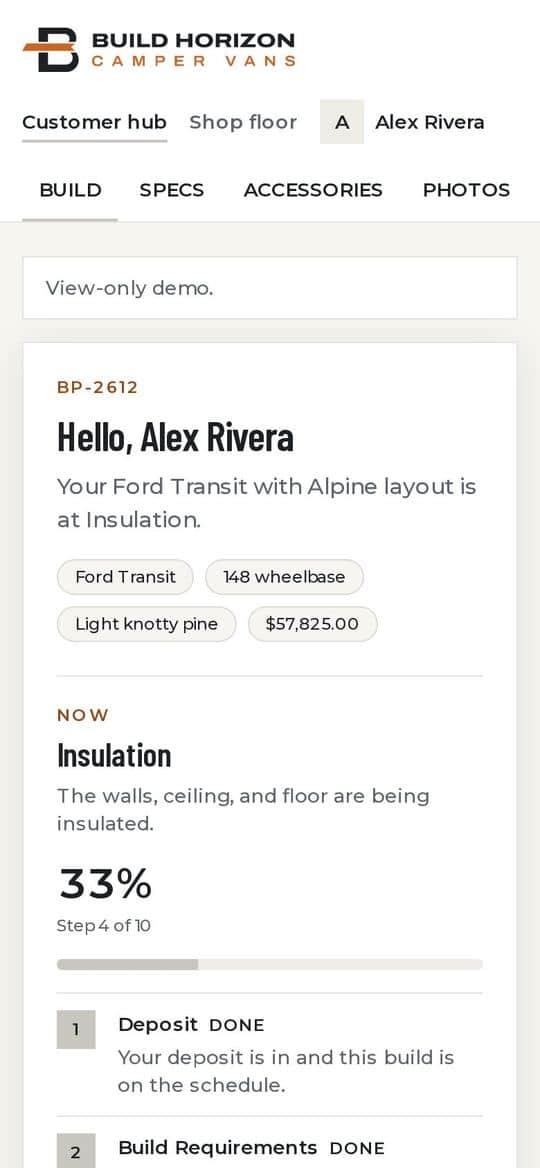
Your customer has a deposit down and months to wait. Build Horizon shows them the current stage, progress photos, their specs and documents, and the handoff date from day one. Questions go to your shop on the order, not buried in texts. Your team sees every build and which customers are waiting on a reply.
- Deposit
- Vehicle on-site
- Insulation
- Electrical
- Handoff
Sample builds, no sign-up. Stages are an example. Yours will match your shop.

For classic restoration and restomod shops.
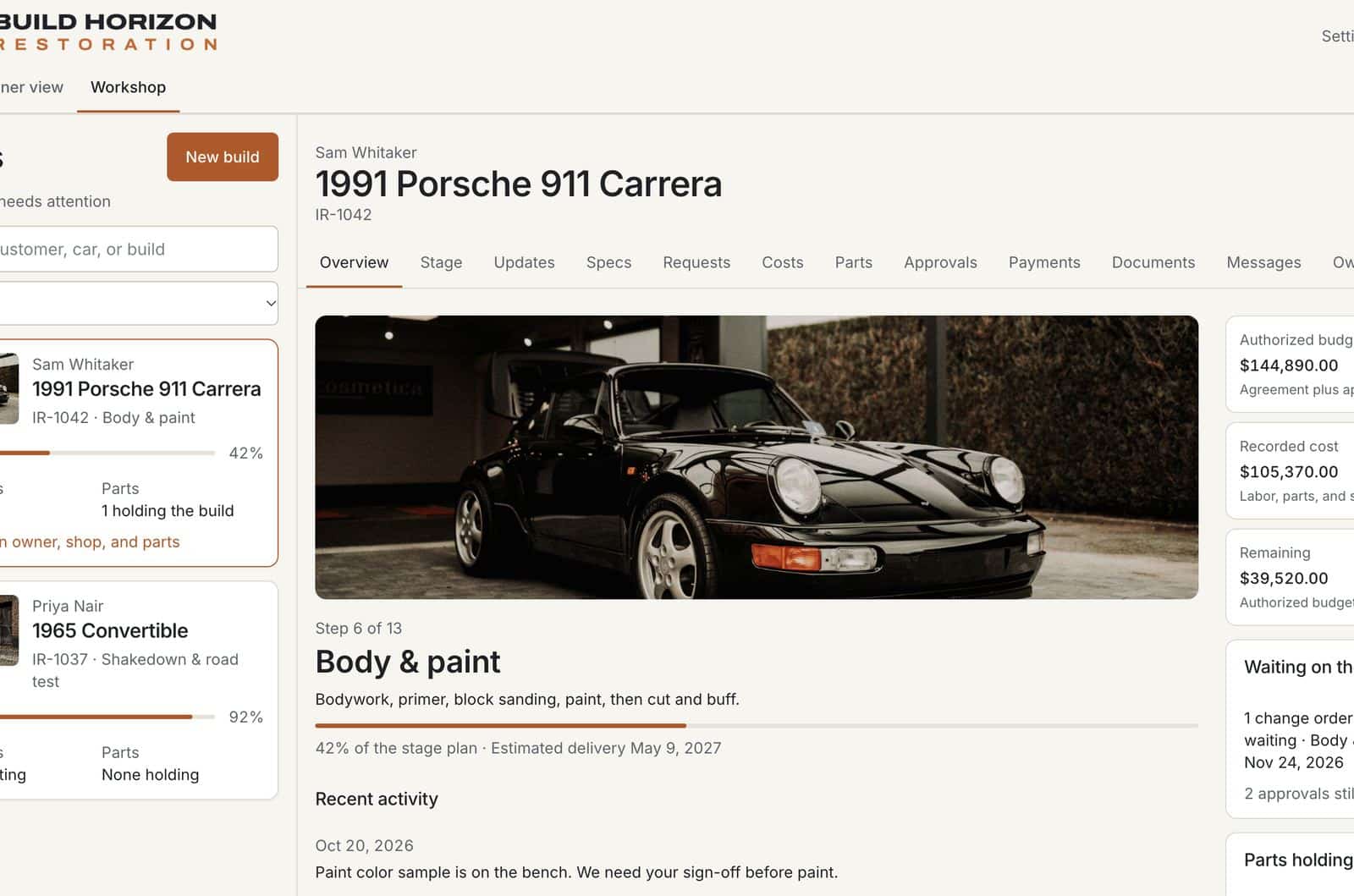
A restoration runs for months, and most owners can’t stop by the bay. Build Horizon shows them each stage, new photos, and what they’re approving before paint, interior, or extra work begins. Your markup stays off their page. Built for full restorations and restomods, with your shop’s own stage list.
- Deposit
- Teardown
- Metal & rust
- Body & paint
- Delivery
Sample car, no sign-up. Stages are an example. Yours will match your shop.
Underneath both
Same portal underneath. Set up for your shop.
Your process
Your stage names, your order, as many as you run. Nothing is locked to a template.
Your brand
Your name, logo, and colors. Customers see your shop, not ours.
Two views
Customers follow their own build. Your shop floor shows every job and what it’s waiting on.
Any screen
Works in the browser on any phone or laptop.
How it works
Three steps. We do the setup.
Pick the version
Camper vans, or classic restoration and restomod. We start from your kind of work.
We set it up
Your stages, your brand, and what customers can see. Specs and documents for vans. Costs and approvals for cars.
Customers follow along
Your team updates the job. Customers check progress themselves instead of calling to ask.
Questions
Questions shops ask
What is Build Horizon?
A customer portal from Liftoff Visibility, branded to your shop. Customers follow their build stage by stage, and your team sees every job in one place. There are two versions: Camper Vans and Restoration.
What’s the difference between the two versions?
Camper Vans follows a van through production: stages, photos, specs, documents, the handoff date, and customer questions. Restoration follows a car through a full restoration or restomod: stages, photos, project cost, and written approvals before irreversible work.
Who does the setup?
We do. We configure your stages, branding, fields, and what customers can see, so your team doesn’t have to build anything.
Can it use our stages and branding?
Yes. Your stage names, in your order, as many as you run, with your shop name, logo, and colors on every screen customers see.
What else can be customized?
Spec and option fields, documents, order details, and the requests and add-ons your shop actually offers. A van builder’s accessory list and a restoration shop’s change orders each get their own setup.
Can customers check from a phone?
Yes. Both versions work on any phone or laptop.
How much does it cost?
Plans start at $200 a month. Fill out the form below and we’ll quote your shop.
Can I try it before talking to anyone?
Yes. Both versions have a live demo with sample data and no sign-up. Open Camper Vans or Restoration.
Walkthrough
See it set up for your shop.
Tell us about your shop and we’ll walk you through the version you build, set up the way you work. It takes 20 minutes.
Thanks. We’ll be in touch.