
This post looks at where those repeat status emails and calls come from, and how a Camper Van Builders customer portal like BuildHub can take most of that load off your shop.
Key takeaways
- Repeat “how’s my van?” check-ins usually point to three gaps: status that lives in someone’s head, scattered specs and files, and questions that get buried.
- A van conversion customer portal makes status self-serve. Your team updates the build once, and the customer checks it whenever they want.
- BuildHub is a customer portal from Liftoff Visibility, designed specifically for Camper Van Builders and customized to each builder’s production process, build stages, branding and business requirements.
- Customers see live build status, progress photos by stage, the spec and documents, and a question thread. Your shop sees every build in progress, with open questions flagged.
- You can click through both sides in the BuildHub live demo. No sign-in needed.
Why camper van build status questions keep coming back
The “how’s my van” check-in is rarely the only problem. It’s usually a sign of a few deeper ones.
Status lives in someone’s head
On a lot of shop floors, the real build status is known by the production manager, the lead tech or whoever touched the van last. Customers can’t see it, so they ask. And because they ask everyone, the same answer gets written over and over.
Specs and files are scattered
“Which layout did we sign off on?” is a question nobody wants to hear twice. When specs, options and photos are spread across inbox threads, it gets hard to tell which version is the latest, for the customer and for your crew.
Questions get buried
“Did anyone get back to them?” When questions come in through email, text and phone, some slip through. Customers feel out of the loop, and your team feels it too.
The common thread: there’s no one place where status, files and questions live together.
What a van conversion customer portal actually changes
A customer portal gives each build its own home. Instead of pushing updates out one message at a time, your team updates the build, and the customer checks it whenever they want. Here’s how that changes production communication day to day.
How BuildHub works as a customer portal for Camper Van Builders
BuildHub is a customer portal from Liftoff Visibility, designed specifically for Camper Van Builders. It gives every customer one place to follow their van from deposit to handoff, and it gives your shop one place to manage every build in progress. (For the full feature tour, see the BuildHub customer portal overview.)
It follows the van build journey
BuildHub is organized around the stages a conversion shop already works through:
Deposit
The build has a spot on the calendar and the customer gets their portal.
Design and layout sign-off
Layout, finishes and options are confirmed and kept on file as the spec.
Vehicle Arrival
The van is at the shop and ready to build.
Build stages
Progress and photos at each step, with a clear percent complete.
Delivery
The handoff date is on the customer’s screen from day one.
Every stage name and step is set up to match the way your shop already runs production.
What your customer sees
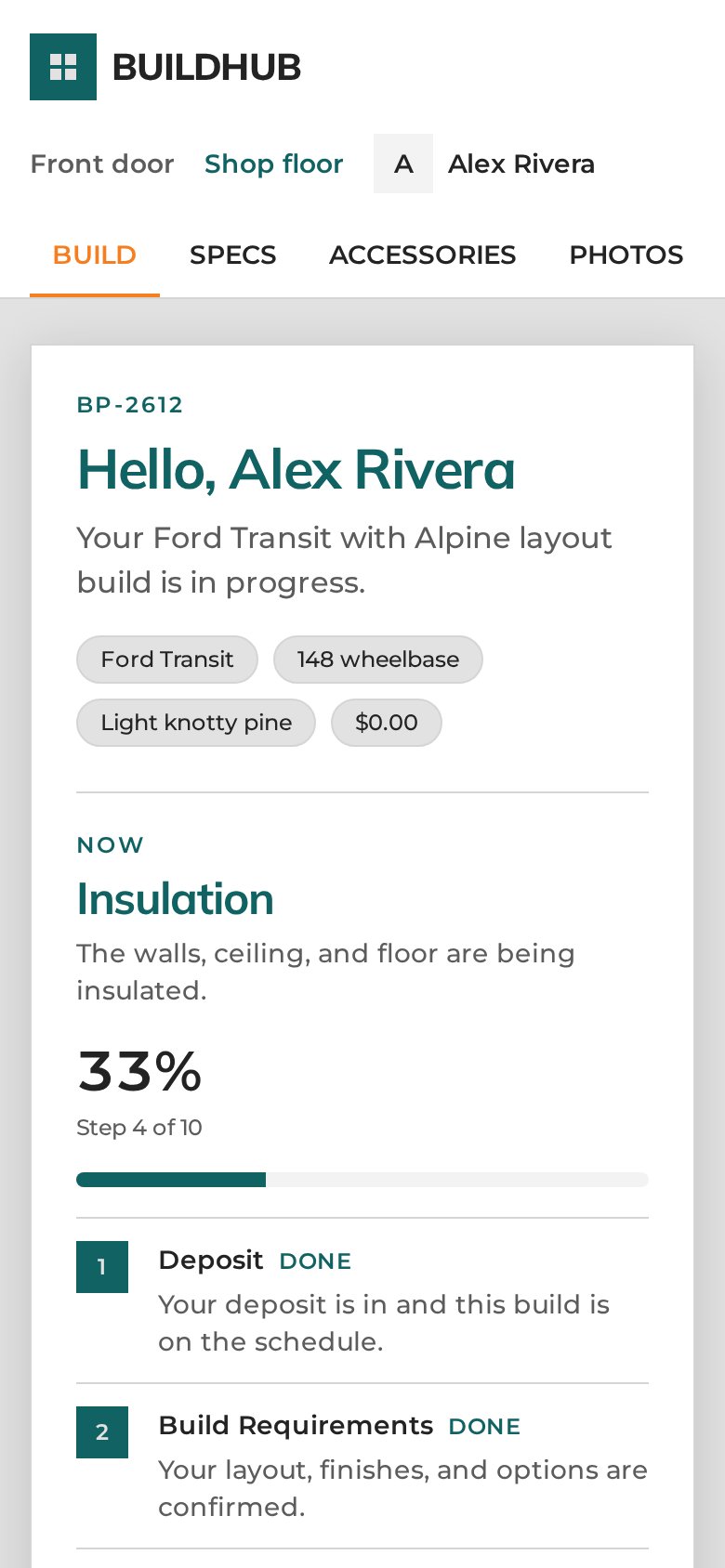
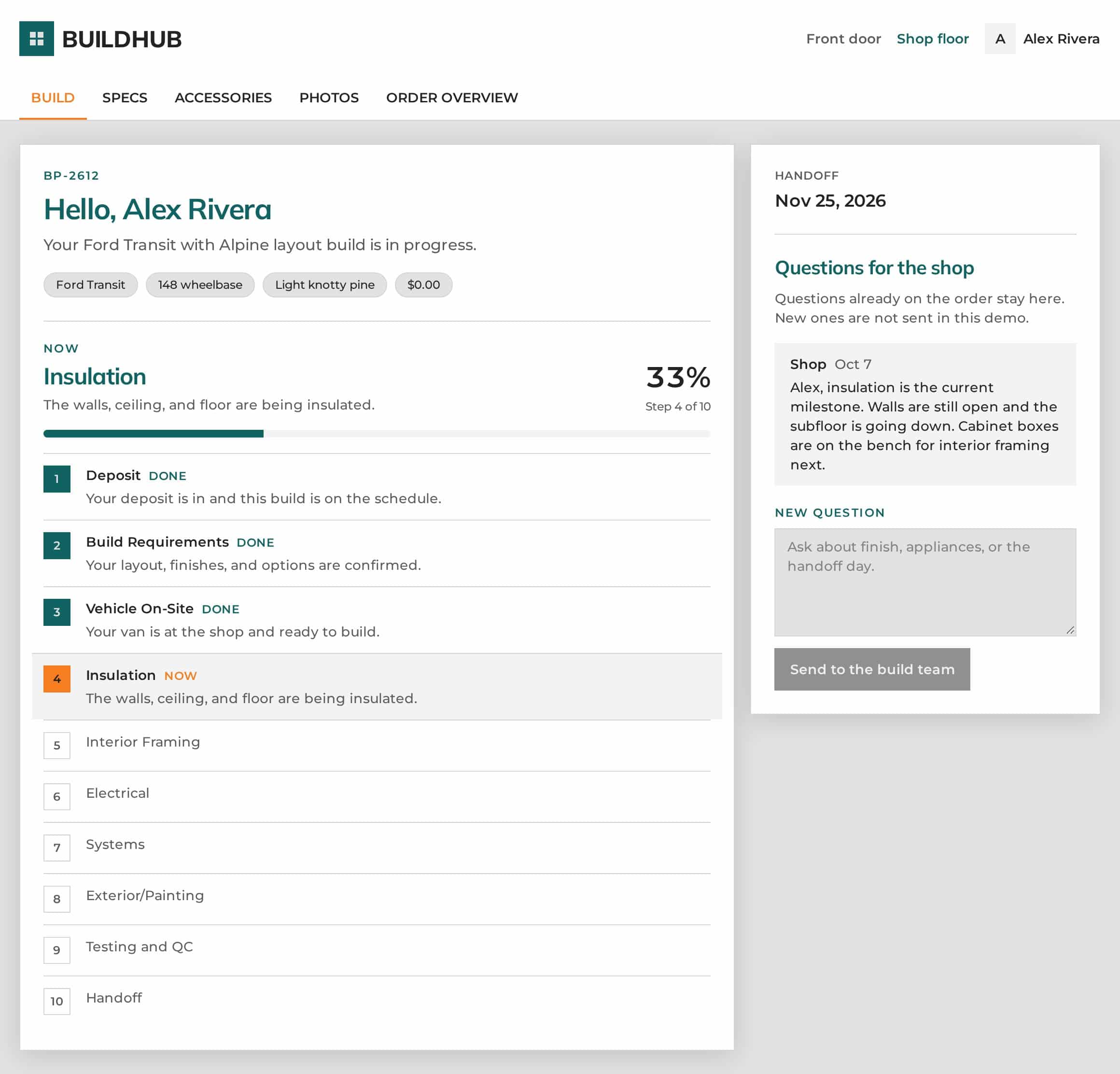
When a customer opens their portal, the answer to “where are we?” is right at the top. It works on a phone as well as a laptop.
- Live build status: the current stage in plain English, percent complete and the planned handoff date.
- Progress photos by stage: captioned photos, each shown with the build stage it belongs to.
- A question thread with the shop: customers ask in the portal, and answers show up in the same thread.
- The spec, docs and blueprints on file: van, layout, wheelbase, wood and exterior, plus the build agreement, order total, layout blueprint and financing note.
- Custom requests and accessories: extra work and parts on the order, marked added once they’re on the van.
What your shop sees
Production communication that doesn’t pull people off the van.
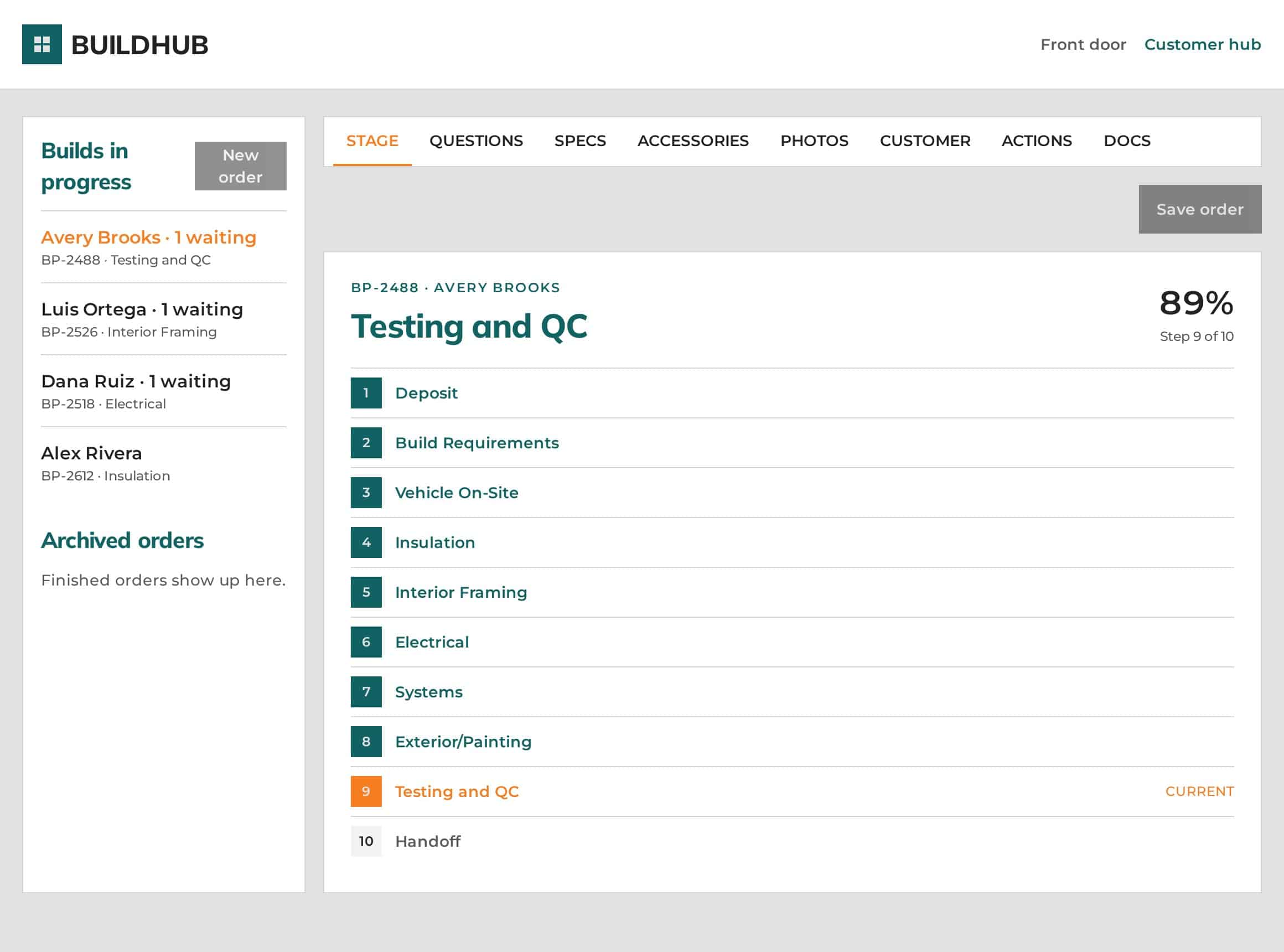
- A shop floor dashboard listing every build in progress, with its current stage.
- Open questions flagged as “waiting,” so nothing sits unanswered.
- Update a stage once and the customer’s view is current. No status emails to write.
- Everything on the order: specs, docs, blueprints, custom requests, photos and questions in one spot.
- Notifications when something needs action, so a response doesn’t wait on someone remembering to check.
See both sides of the portal in the live demo
These screenshots come from the BuildHub demo, which runs on sample orders. Click any of them to open the live demo.
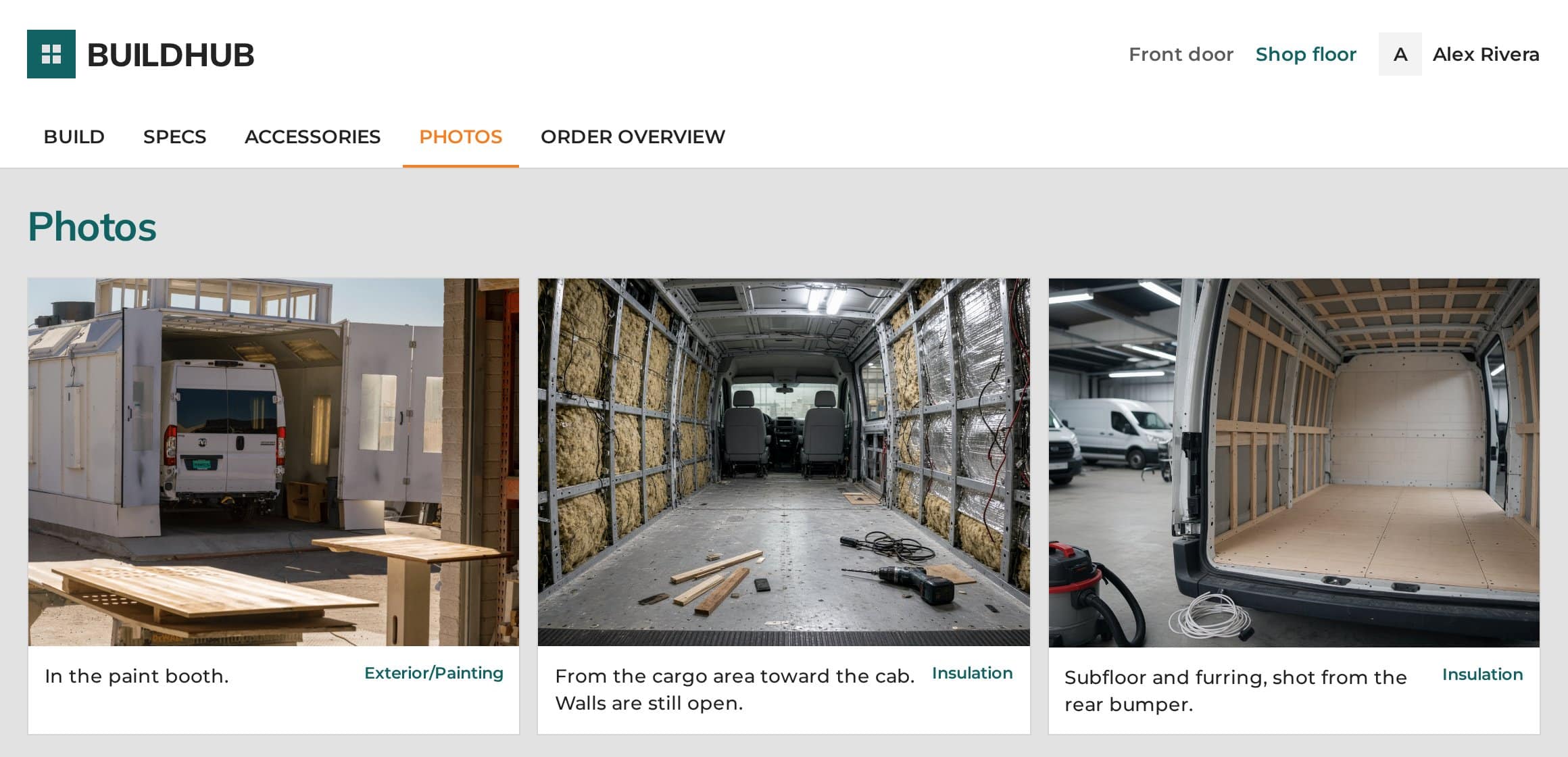
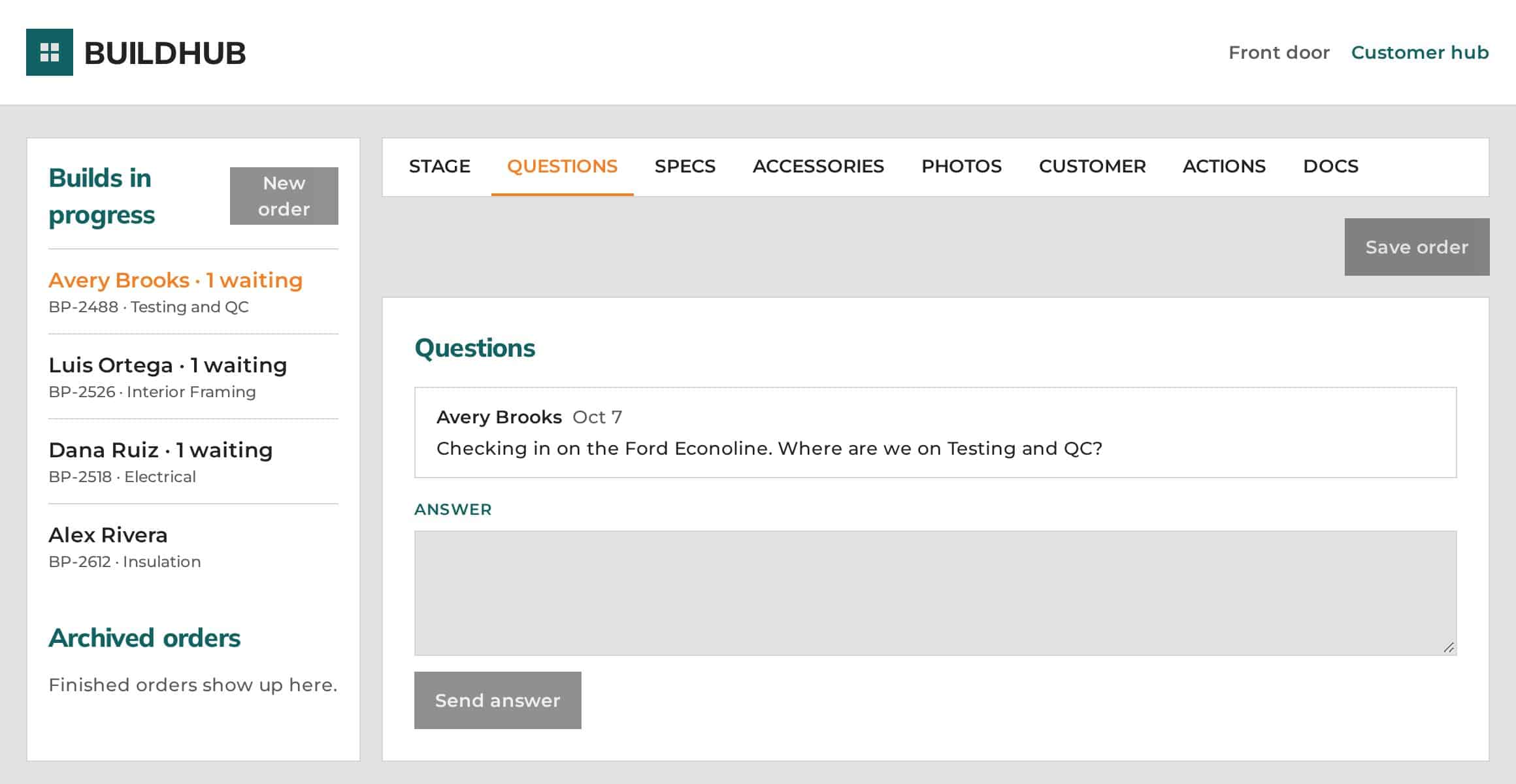
Want the full tour? Open the BuildHub live demo or read the customer portal overview for Camper Van Builders.
Putting it to work: better van conversion production communication
The value of a portal comes from making it part of the routine, not an extra chore. A few practical habits help:
Make stage updates part of the workflow
When a van moves from one stage to the next, update the stage in the dashboard. That single step replaces the status emails you’d otherwise be writing.
Post photos as you go
Upload a photo with a caption at each stage. Because each photo is tied to the stage it belongs to, customers can watch their van come together without asking for pictures.
Point customers to the portal
When a status question does come in by email or phone, answer it and point the customer to their portal, where the same information is always current.
Keep the spec on the order
Once design and layout sign-off is done, keep the spec, documents and blueprints on the order. When anyone asks which version is final, the answer is already in one spot.
Watch the “waiting” flags
Make a quick daily pass through the shop floor dashboard for builds flagged as “waiting.” It’s a simple way to make sure no customer question gets buried.
The payoff: fewer interruptions, a tighter shop
When status, files and questions live in one place, the shop gets fewer repeat emails and calls, because customers can check for themselves. Your internal process tightens up, too, because specs, docs, blueprints, custom requests, photos and questions all live on the order instead of in inboxes and memory.
Fewer repeat check-insCustomers check status for themselves instead of emailing, texting or calling.
A tighter internal processSpecs, docs, photos and questions live on the order, not in inboxes and memory.
A more professional experienceCustomers follow their van from deposit to delivery, and your crew stays on the van.
Camper van build tracking software: common questions
What is a customer portal for Camper Van Builders?
It’s one place where each customer can follow their van build: the current stage, progress photos, the spec and documents on file, and a question thread with the shop. BuildHub is a customer portal from Liftoff Visibility, designed specifically for Camper Van Builders, so the portal follows the van build journey from deposit to delivery.
Can BuildHub match our build stages and branding?
Yes. BuildHub is customized to each builder’s production process, build stages, branding and business requirements. Your stages appear in your order, with your names, and the portal carries your shop’s look.
Will this add more work for my crew?
The goal is less work, not more. When a van moves to the next stage, someone updates the stage once and the customer’s view is current. Posting a captioned photo at each stage replaces the one-off pictures customers would otherwise ask for.
How do customer questions get answered?
Customers ask in their portal, and the question lands on the order. Open questions are flagged as “waiting” on the shop floor dashboard, notifications go out when something needs action, and the answer shows up in the customer’s thread.
Can customers check their build status from a phone?
Yes. The customer portal works on a phone as well as a laptop, so customers can check build status, photos and documents from wherever they are.
How much does BuildHub cost, and how do I see it?
Pricing is available on request. Start with the live demo at buildhub.liftoffvisibility.com, which shows both the customer hub and the shop floor with sample orders and needs no sign-in. Then email kobrien@liftoffvisibility.com to book a 20-minute call and see how BuildHub would look set up for your shop.
See BuildHub for yourself
The fastest way to understand BuildHub is to click through it. The live demo shows both sides, the customer hub and the shop floor, with sample orders. It takes about two minutes, and there’s no sign-in needed.
Then, if you’d like to see how it would look set up for your shop, book a 20-minute call with Liftoff Visibility. Pricing is available on request.
Prefer email? Write to kobrien@liftoffvisibility.com.